SMS Alerts
FenceQuoter LLC sends text message alerts to fence contractors who subscribe to FenceQuoter. These messages are sent only to business owners and staff at contractor businesses that have signed up for the service and opted in — FenceQuoter does not send text messages to homeowners or to anyone who has not requested them.
What we send
A text alert when a new homeowner lead or booking comes in through your FenceQuoter widget, summarizing the job and linking to the full lead in your dashboard. Nothing else — no marketing, no promotions.
Sample message
New booking: Jane Doe, 1428 Elm St, Saint Paul, MN, ~120 LF Wood — Cedar 6ft, 1 gate(s), $7200-$8400 range. Reply STOP to opt out.
View booking: https://fencequoter.app/dashboard/leads/a1b2c3d4-0000-0000-0000-000000000000
How to opt in
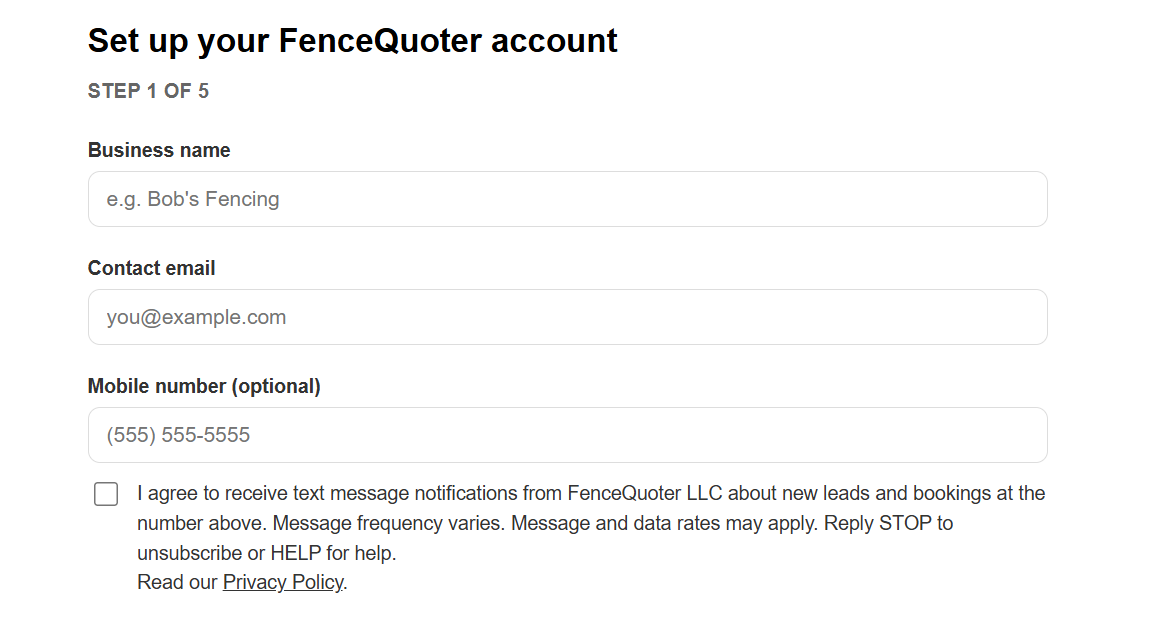
Contractors opt in in one of two places: on Step 1 of signup at fencequoter.app/onboard, or later in the Text-message alerts section of dashboard Settings. In either place, the contractor enters a mobile number and checks a box that reads: “I agree to receive text message notifications from FenceQuoter LLC about new leads and bookings at the number above. Message frequency varies. Message and data rates may apply. Reply STOP to unsubscribe or HELP for help.” The box is unchecked by default and is not required to sign up for FenceQuoter.
Message frequency
Message frequency varies and depends on how many leads your widget receives.
Cost
Message and data rates may apply. FenceQuoter does not charge for these messages.
How to stop
Reply STOP to any message to stop receiving them. Reply HELP for help, or contact support@fencequoter.app.
Privacy
Read our Privacy Policy to see how FenceQuoter handles your information.